United Kingdom · incumbent research · notice literacy
Find the incumbent / last award on Contracts Finder
Before you spend a week on a renewal lot, it helps to know who won last time. Paid aggregation tools exist — but Contracts Finder and Find a Tender publish award notices for free. This guide teaches the DIY method for facilities, cleaning and trades SMEs on roughly £10k–£250k lots. It is notice literacy only: how to find who holds the contract, not how to write the bid.
Free weekly · £19/mo daily · £9.99 memo · £29.99 pack
Why knowing the incumbent matters
On a bid/no-bid decision, incumbent research is one gate — not the whole verdict. It answers: who won last time, when, and is this likely a straight renewal?
- Renewal risk. A specialist incumbent with a contract ending in three months and a short clock may be hard to displace — even when the value looks attractive.
- Scoring advantage. Some evaluation models weight incumbent knowledge, TUPE continuity, or transition risk. You will not see the weighting on the notice; you may still want to know who you are chasing.
- Scope reality-check. The last award title and value tell you whether “cleaning” means a two-person school contract or a multi-site FM bundle.
This is triage input, not a reason to bid or not bid on its own. Pair it with clock, trade fit and the other gates in the ten-minute notice read.
The free method: Contracts Finder Award Notice search
You do not need a £500/month subscription to find a previous winner on many UK public contracts. The portals publish award notices alongside live tenders.
-
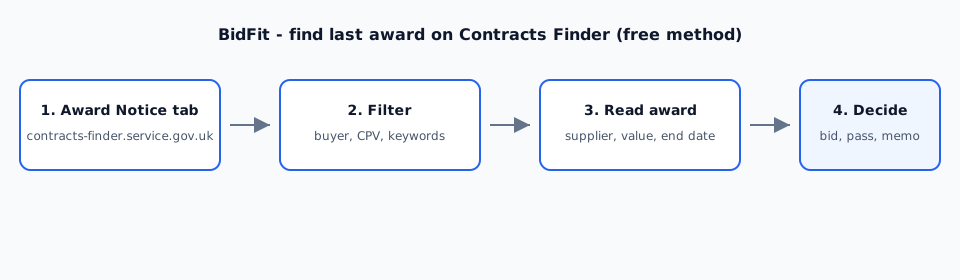
Open Contracts Finder search. Go to contracts-finder.service.gov.uk/Search. If the live notice is on Find a Tender (above-threshold work), repeat on find-tender.service.gov.uk/Search.
-
Switch notice type to Award Notice. On Contracts Finder, change the notice-type filter from Contract Notice to Award Notice. This is the step most SMEs miss — they search live tenders and wonder why no winner appears.
-
Filter by buyer + CPV + keywords. Enter the buyer name from your live notice (council, college, NHS trust). Add the CPV code if you have it. Add keywords from the title — site name, “grounds maintenance”, “window cleaning”, school name. Narrow until results look like the same scope, not every award the buyer ever published.
-
Open the most recent plausible award. Sort by date. Pick the award whose title and value band match the live lot. Read the full notice page — supplier name, award date, total value, contract period.
-
Cross-check the supplier. Note the legal name. A quick Companies House lookup confirms the entity still exists and whether it is a Ltd, LLP or group company. BidFit’s £9.99 memo includes this step when you order on a named URL.
What to look for on the award notice
On the published award page, capture:
- Winning supplier name — the legal entity, not a trading name alone.
- Award date — when the buyer signed.
- Contract value — total or annual; note which.
- Contract start and end dates — does the live tender align with expiry?
- Procedure type — open tender, framework call-off, direct award under framework rules.
On your checklist, mark incumbent Pass if no award is found and the live notice reads like an open market; Fail if a strong specialist incumbent plus short clock plus scope you do not hold makes the bid uneconomic; Unknown if award data is missing or ambiguous. See the incumbent row in the bid/no-bid checklist.
Limitations — when the free method comes up empty
Public award data is incomplete. Expect gaps:
- Not every award is published. Some below-threshold or framework call-offs never appear on Contracts Finder.
- Framework mini-competitions may award to a panel member without a standalone award notice you can easily find.
- Stale data. The last visible award may be two or three years old if the contract was extended by variation rather than re-tendered.
- Name changes. Buyer rebrands (council mergers, trust renames) break keyword search unless you try older names.
- Wrong CPV. Buyers miscode notices. If CPV-only search fails, retry with title keywords and buyer name alone.
“Not found in public award data” is a valid memo outcome — not proof the field is open. Do not invent an incumbent from memory.
DIY vs £9.99 memo — time vs accuracy
Do it yourself when:
- You have fifteen minutes, a clear buyer name, and one notice to check.
- The award is recent, on Contracts Finder, and the title obviously matches.
- You are still in discovery mode — the free weekly digest or £19/month daily list is enough.
Order a £9.99 public-notice memo when:
- The notice survived ten-minute triage and someone will ask “who holds this now?”
- You want a sourced incumbent snapshot and Companies House check on one URL before bid-writing spend.
- Award search returned nothing and you need “not found” documented, not guessed. See when a notice match needs a memo.
£29.99 pack memo only when pack-only gates (scoring weights, detailed TUPE, turnover schedule) must be filled from the ITT/SQ you forward. Incumbent work sits on the £9.99 product.
Trade-specific context for soft FM SMEs: facilities, cleaning & trades sector page.
What BidFit will not do
- Not bid writing. Knowing the incumbent does not write your method statement or price schedule.
- Not a paid aggregation dashboard. We search public portal data for one memo — we do not sell subscription incumbent databases.
- Not a guarantee. If the buyer did not publish an award notice, we say so.
Questions
How do I find the incumbent on Contracts Finder for free?
On contracts-finder.service.gov.uk, switch the notice type to Award Notice. Search by buyer name, CPV code and keywords that match the live tender. Open the most recent award for the same buyer and scope. The winning supplier name, award date, contract value and end date are on the published award notice.
Where is the Award Notice tab on Contracts Finder?
On the Contracts Finder search page, use the notice-type filter and select Award Notice (not Contract Notice). Combine that with a buyer filter, CPV code and keyword search. On Find a Tender, use the equivalent award-notice search for above-threshold work.
What should I record from a last-award notice?
Record the winning supplier name, award date, total contract value, contract start and end dates, and whether the award was a framework call-off or open tender. Cross-check the supplier on Companies House if you need to confirm the legal entity.
Does BidFit do incumbent research for me?
Yes, on a £9.99 public-notice memo. We search Contracts Finder and Find a Tender award data for the buyer and scope tied to your notice URL, snapshot any named winner, and run a basic Companies House check. We do not write bids or guarantee every incumbent is published.
More guides
All BidFit guides: /guides/. Bid/no-bid checklist: bid/no-bid decision for UK SMEs. Notice triage: how to read a tender notice in ten minutes. Memo vs digest: when a match needs a memo. Turnover gates: turnover requirements on Contracts Finder notices. TUPE wording: TUPE wording cues on Contracts Finder.
Start with discovery, decide on one notice
Take the free weekly list. When a named notice survives triage and you want the incumbent done for you, order a £9.99 memo — or run the Award Notice search yourself.