United Kingdom · Soft FM · Contracts Finder
How to filter Contracts Finder lots for soft FM without drowning in alerts
Portal how-to for soft FM, cleaning and trades SMEs watching roughly £10k–£250k lots. Value bands, short keyword lists, CPV hygiene, and a weekly review cadence — not a notice story, and not bid writing.
If you only want the short weekly list, skip ahead to BidFit’s free tender digest or start at /digest/. If you want the portal filters done properly first, read on. For the wider two-portal alert setup, see Contracts Finder + Find a Tender alerts without six tabs.
Free weekly · £19/mo daily · £9.99 memo · £29.99 pack
Why soft FM alerts flood so fast
Soft FM, commercial cleaning, window and façade work, grounds, and reactive trades sit under buyer wording that is inconsistent week to week. A single saved search on “cleaning” or “facilities” will pull hospital soft FM, specialist clinical kit, national framework lots, and multi-million hard FM packages you will never deliver.
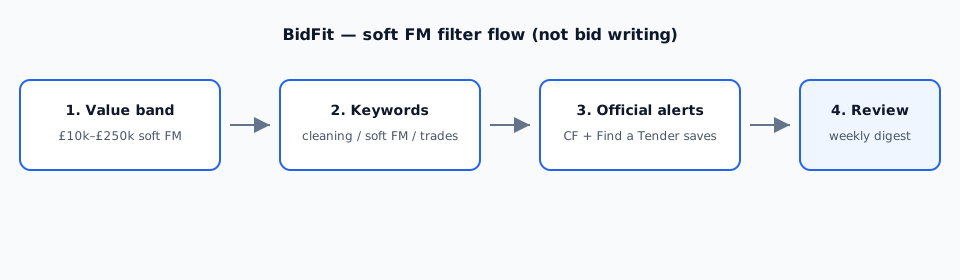
The fix is not more aggregators. It is a tight value band, a short keyword list you actually open, and a habit of deleting saved searches that only deliver noise. Official Contracts Finder and Find a Tender remain the source of truth — BidFit’s digest is an optional shortlist on top, not a replacement.
Start with a realistic value band
GOV.UK’s Contracts Finder page explains that Contracts Finder covers contracts worth over about £12,000 (including VAT) with government and its agencies. Higher-value UK public and utilities work usually sits on Find a Tender (often above about £139,688 including VAT).
For many soft FM and trades SMEs in BidFit’s digest lane, a practical Contracts Finder starting band is roughly £10k–£250k:
- Set a maximum you can staff and insure — not aspirational £2m framework lots.
- Set a floor that drops trivial call-offs and micro lots you never chase.
- Keep a separate Find a Tender saved search only if you genuinely bid above the FaT band; otherwise Contracts Finder does most of the work.
- Review after one week of mail. Widen or tighten the band from evidence, not hope.
Build a short keyword list (not one noisy word)
One broad word is how soft FM inboxes drown. Prefer a small set of phrases that match what you deliver, then save each as a named search rather than OR-ing everything into one alert.
Examples that often work for facilities, cleaning and trades (pick what you actually do — do not copy the whole list):
- cleaning / soft FM / facilities management (only if you deliver multi-site soft FM)
- window cleaning / façade cleaning / building cleaning
- grounds maintenance / groundskeeping / external works
- reactive maintenance / planned maintenance (trades-specific)
- school cleaning / housing cleaning / NHS estates (only if those are real buyers for you)
Avoid stacking every adjacent CPV and keyword into one search “just in case”. Three sharp saved searches beat twelve overlapping ones. Name each search after the filter set (“East Midlands · window cleaning · under £100k”), not after hope.
CPV codes: useful, inconsistent, secondary
Buyers code inconsistently. Window cleaning may sit under building-cleaning CPVs one week and “building completion” the next. Treat CPVs as a secondary filter once keywords and value are set — not as the only net.
- Start from the CPV families that match your trade, then check the first week of results for misses and false hits.
- If widening the CPV set doubles the noise without catching real lots, roll it back.
- Never assume a CPV list replaces reading the notice title, buyer, and location.
Region and buyer hygiene
-
Limit geography to where you can cover. A national “cleaning” alert for a two-van firm is alert spam with a GOV.UK badge.
-
Prefer official saved searches on Contracts Finder and, if needed, Find a Tender over random commercial aggregators you never audit.
-
Review weekly. Unsubscribe or delete any alert that never matches your trade, region, or value band. Silence is a feature.
-
Keep the list short. Add a second search only after the first week’s mail proves the first one is clean.
A practical weekly checklist
- Open Contracts Finder (and FaT if you use it) — do not rely only on email subject lines.
- Skim title, buyer, location, value, and closing date before downloading packs.
- Delete or retune any saved search that delivered only framework noise or wrong geography.
- Keep official alerts as source of truth; use BidFit’s digest when you want one short email matched to trade and region.
More context for this audience: facilities, cleaning and trades sector page · sibling portal guide: Contracts Finder + Find a Tender alerts.
Where BidFit’s digest sits
BidFit’s growth product is a profile-matched email, not another portal UI. You set trade and region once. We watch Contracts Finder and Find a Tender against that profile and send a short list — free weekly (up to three matches) or £19/month daily. Details: free UK tender digest; signup: /digest/.
- One email instead of two overlapping portal alert streams for the notices most likely to fit.
- Matching aimed at what you do and where you can cover — not a shopping-list crawl across every soft FM CPV.
- Public notices only. No inside information from the portal.
Keep the official saved searches. Use BidFit when you want the Monday list shortened to “plausible for us”, not when you want a searchable archive of every UK notice.
What BidFit is not
- Not bid writing. We do not draft responses, complete SQs, or register you on buyer portals.
- Not a search engine. There is no dashboard of every notice and no “AI tender search”.
- Not a replacement for GOV.UK. Contracts Finder and Find a Tender remain free and authoritative. BidFit reuses public sector information under the Open Government Licence.
Questions
What value band should soft FM SMEs start with on Contracts Finder?
Many facilities, cleaning and trades SMEs watching BidFit’s digest lane start with roughly £10k–£250k. Set a maximum you can actually deliver, and a floor that excludes trivial call-offs you will never chase. Adjust after one week of alert mail, not before.
Is BidFit a tender search engine?
No. BidFit is not a search engine, not a dashboard, and not “AI tender search”. The free digest is a short weekly list of public notices matched to the trade and region profile you give us. Sources remain Contracts Finder and Find a Tender.
Do you write bids?
No. BidFit does not write bids, complete SQs, or register you on buyer portals. The digest surfaces matches. An optional memo is a sourced Go / No-go decision document, not a bid.
Should I turn off official portal alerts if I use BidFit?
No. Keep the free official saved searches as your source of truth. Use BidFit when you want one short email matched to trade and region instead of living in keyword noise across two inboxes.
More guides
All BidFit guides: /guides/. Commercial cleaning CPV search: commercial cleaning contracts on Contracts Finder. For the wider two-portal alert setup, see Contracts Finder + Find a Tender alerts without six tabs. Product overview: free tender digest.
Want the short weekly list instead?
Keep official saved searches as your source of truth. Use BidFit when you want one short email matched to trade and region.