United Kingdom · Contracts Finder + Find a Tender
How to get Contracts Finder and Find a Tender alerts without living in six tabs
Facilities, cleaning and trades directors already know the portals. The grind is keeping two free alert systems sharp enough that Monday does not mean six browser tabs, three keyword strings, and an inbox full of CPV noise. This guide covers the official saved searches first — then where a short weekly digest helps without replacing the portals.
Free weekly · £19/mo daily · £9.99 memo · £29.99 pack
If you only want the free weekly list, skip ahead to BidFit’s free tender digest or start at /digest/. If you want the portal setup done properly first, read on.
Why one portal is not enough
England’s public pipeline is split by value and regime. GOV.UK’s Contracts Finder page explains that Contracts Finder is for contracts worth over about £12,000 (including VAT) with government and its agencies. The same page points higher-value work to Find a Tender.
GOV.UK’s Find a Tender page describes Find a Tender as the service for high-value contracts in the UK’s public and utilities sectors — usually above about £139,688 including VAT. The live service sits at find-tender.service.gov.uk; Contracts Finder’s live search is at contractsfinder.service.gov.uk.
For an SME cleaning, FM, or trades firm that sometimes bids £40k school work and sometimes a larger framework lot, that means two accounts, two saved-search setups, two alert cadences. Scotland, Wales and Northern Ireland also keep their own portals (Public Contracts Scotland, Sell2Wales, eTendersNI) — this guide stays on the England/UK pair most BidFit readers already have open.
Set official Contracts Finder alerts
Contracts Finder still lets suppliers create a free account, save searches, and get email updates. GOV.UK’s overview is the right starting point: www.gov.uk/contracts-finder.
-
Register or sign in on Contracts Finder. You can search without an account; you need one for saved searches and email alerts.
-
Run a search you would actually open. Prefer region + a tight keyword or CPV set over a single broad word like “cleaning” or “facilities”. Add a realistic minimum/maximum value if your firm will never chase £2m lots.
-
Save the search and choose an alert frequency. Name it after the filter set (“East Midlands · window cleaning · under £100k”), not after hope. Review the first week of mail before you add a second search.
-
Keep the list short. Three sharp saved searches beat twelve overlapping ones. Delete anything that only ever delivers framework noise or the wrong geography.
Set official Find a Tender alerts
Find a Tender’s enhanced service (Procurement Act 2023) also supports saved searches and email notifications once you are signed in with a GOV.UK One Login. Cabinet Office’s short guide for buyers and suppliers walks through filters and the save search flow: How to use the Central Digital Platform / enhanced Find a Tender.
-
Sign in at Find a Tender with GOV.UK One Login. Register a supplier organisation if you need the full account features.
-
Search, then filter. Use notice type (for example tender notices), location, and CPV or keywords that match what you actually deliver — not every adjacent FM code on the list.
-
Save the search and pick a notification frequency. Treat FaT the same way as Contracts Finder: one named alert per real filter set, reviewed after the first week.
-
Remember the value split. FaT alerts will not replace Contracts Finder for lower-value England notices. Keep both if your pipeline spans both bands.
Where official alerts still leave a gap
The portals are free and they are the source of truth. They are also designed for every supplier category at once. Facilities and trades SMEs hit the same three frictions:
- Noise. A keyword like “cleaning” or “maintenance” pulls hospital soft FM, specialist clinical kit, and national framework lots you will never bid. Daily digests from two portals quickly become a second job.
- CPV and keyword sprawl. Buyers code inconsistently. Window cleaning may sit under building-cleaning CPVs one week and “building completion” the next. To catch both, you widen the net — and the noise comes back.
- Two inboxes, six tabs. Contracts Finder, Find a Tender, maybe a buyer portal login, the notice PDF, Companies House, and the last award page. Alert email is only the start of the tab pile.
Commercial alert products in this space (the BidSquirrel / Jorpex style of “we watch portals so you do not”) compete on coverage dashboards and volume. That helps some firms. It does not fix the core SME problem: you still need a short list that fits your trade and geography, not another feed of everything with a cleaning CPV.
Where BidFit’s digest sits
BidFit’s growth product is a profile-matched email, not another portal UI. You set trade and region once. We watch Contracts Finder and Find a Tender against that profile and send a short list — free weekly (up to three matches) or £19/month daily. Details and signup are on the free UK tender digest page; magic-link signup is at /digest/.
What that means in practice for facilities, cleaning and trades SMEs in the roughly £10k–£250k band:
- One email instead of two overlapping portal alert streams for the notices most likely to fit.
- Matching aimed at what you do and where you can cover — not a shopping-list crawl across every CPV.
- Public notices only. No inside information from the portal.
Keep the official saved searches. Use BidFit when you want the Monday list shortened to “plausible for us”, not when you want a searchable archive of every UK notice.
What BidFit is not
- Not bid writing. We do not draft responses, complete SQs, or register you on buyer portals.
- Not a search engine. There is no dashboard of every notice and no “AI tender search”.
- Not a replacement for GOV.UK. Contracts Finder and Find a Tender remain free and authoritative. BidFit reuses public sector information under the Open Government Licence.
If a digest brief is worth a decision document, that is a separate optional product — a sourced Go / No-go memo from a notice URL. It is still not a written bid. See prices.
Questions
Do I need both Contracts Finder and Find a Tender?
Yes, if you bid UK public work across value bands. Contracts Finder covers lower-value England opportunities (over about £12,000 including VAT). Find a Tender is the route for higher-value UK public and utilities procurements (usually above about £139,688 including VAT). One portal’s alerts will not cover the other.
Is BidFit a tender search engine?
No. BidFit is not a search engine, not a dashboard, and not “AI tender search”. The free digest is a short weekly list of public notices matched to the trade and region profile you give us. Sources remain Contracts Finder and Find a Tender.
Do you write bids?
No. BidFit does not write bids, complete SQs, or register you on buyer portals. The digest surfaces matches. An optional memo is a sourced Go / No-go decision document, not a bid.
Should I turn off official portal alerts if I use BidFit?
No. Keep the free official saved searches as your source of truth. Use BidFit when you want one short email matched to trade and region instead of living in keyword noise across two inboxes.
More guides
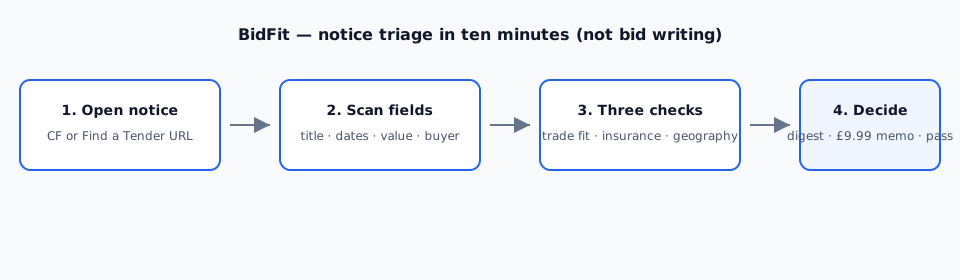
All BidFit guides: /guides/. Notice triage: how to read a tender notice in ten minutes. TUPE wording: TUPE wording cues on Contracts Finder. For soft FM filter hygiene on Contracts Finder (value band, keywords, CPV), see Soft FM Contracts Finder filters. Product overview: free tender digest.
Start with the free weekly list
Set the official alerts once. If you still want one short email for facilities, cleaning and trades matches, take the free digest.